环境配置
Git安装
https://git-scm.com/
Node.js安装
https://nodejs.org/en/download/
Hexo安装
1
2
3
4
5
6
7
|
npm install -g hexo-cli
hexo init <folder>
cd <folder>
npm install
|
Github配置
创建仓库
仓库名称必须为用户名 + github.io,可视化为Public
git配置
1
2
3
|
git config --global user.name "xxx"
git config --global user.email "xxx@gmail.com"
|
SSH KEY配置
1
2
3
4
5
|
ssh-keygen -t rsa -C "xxx@gmail.com"
ssh -T git@github.com
|
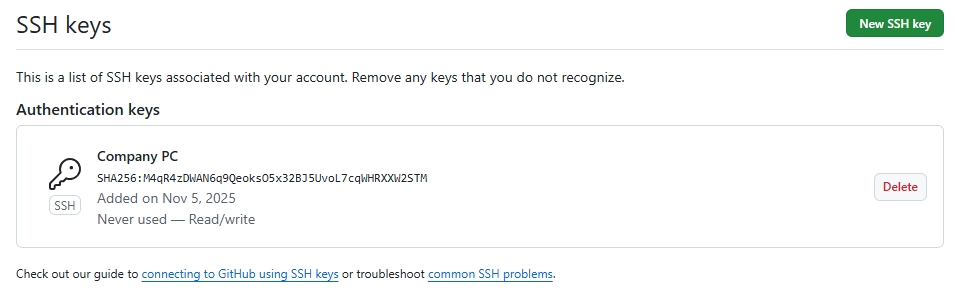
可能会出现错误ssh: connect to host github.com port 22: Connection timed out
1
2
3
4
5
6
7
8
9
10
11
12
13
14
|
touch ~/.ssh/config
Host github.com
HostName ssh.github.com
User git
Port 443
PreferredAuthentications publickey
IdentityFile ~/.ssh/id_rsa
ssh -T git@github.com
|
一键部署
1
2
|
npm install hexo-deployer-git --save
|
1
2
3
4
5
|
deploy:
type: git
repo: git@github.com:xxx/xxx.github.io.git
branch: main
|
hexo源文件同步github
网友教程
main分支存放hexo生成的静态文件,而source分支设置为默认分支,存放hexo源文件
1
2
3
4
5
6
7
8
9
10
|
git clone git@github.com:xxx/xxx.github.io.git
git add .
git commit –m add_branch
git push
|
github图床配置
jsdeliver节点可能存在不可用的网络问题
- 创建github仓库,并生成token
- 配置PicGo(PicGo github地址),设置自定义域名https://gcore.jsdelivr.net/gh/Ethylenekun/images
- typora设置,图像 - 上传图片 - 上传服务(PicGo_app)
NAS图床设置
知乎教程
1
2
3
|
cd C:\Users\yixi7\AppData\Roaming\picgo
npm install picgo-plugin-ftp-uploader
|
PicGO FTP上传配置
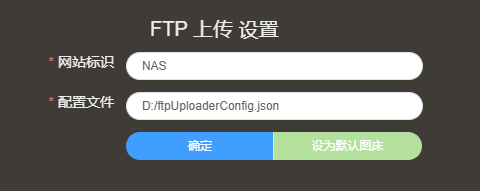
1
2
3
4
5
6
7
8
9
10
11
| {
"NAS": {
"url": "http://xxx:5543/",
"path": "/{year}/{month}/{day}/{fullName}",
"uploadPath": "/PicBed/upload/{year}/{month}/{day}/{fullName}",
"port": 5542,
"host": "xxx",
"username": "xxx",
"password": "xxx"
}
}
|
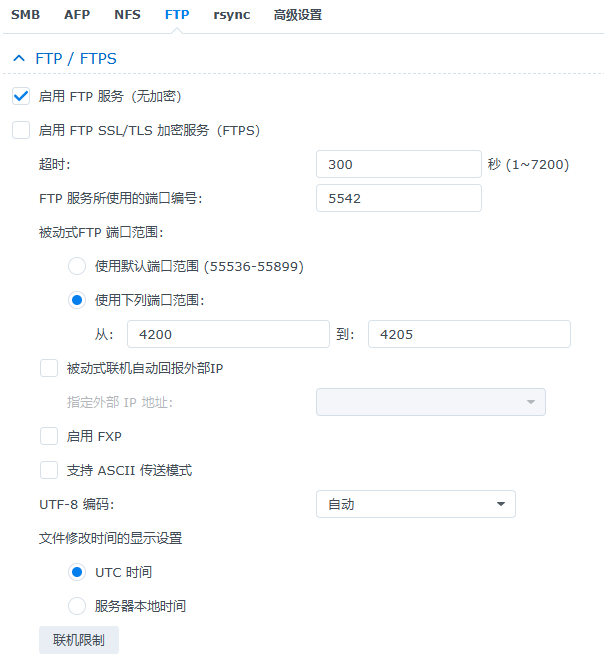
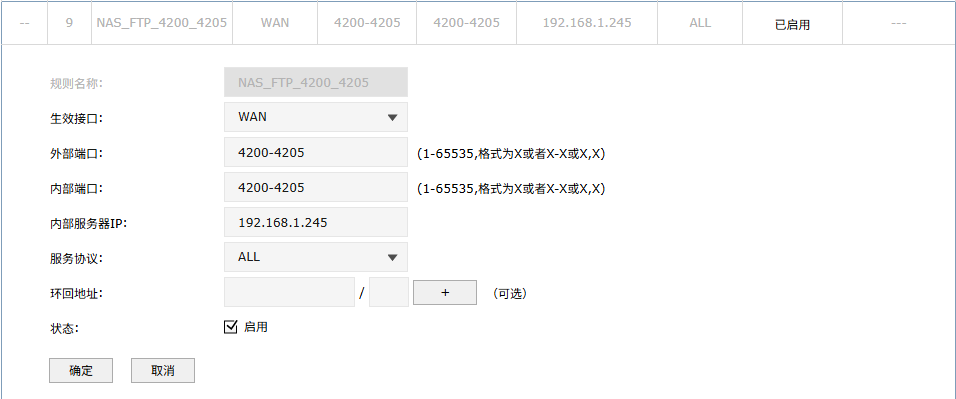
NAS FTP设置:由于上传的用户少,被动端口范围设置为4200-4205
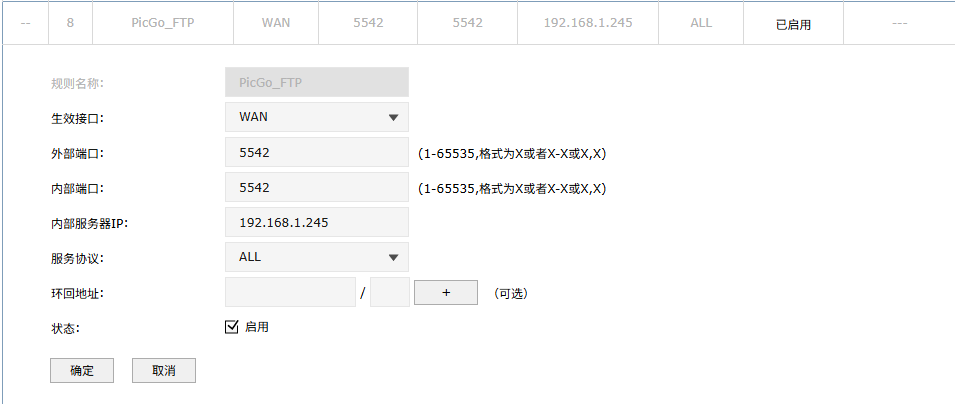
路由设置:FTP端口转发,FTP服务端口和被动端口都要设置转发
主题设置
Butterfly官方文档
快速开始
1
2
3
4
5
6
7
8
|
git clone -b master https://github.com/jerryc127/hexo-theme-butterfly.git themes/butterfly
theme: butterfly
npm install hexo-renderer-pug hexo-renderer-stylus --save
|
升级建议
在 hexo 的根目錄創建一個文件 _config.butterfly.yml,並把主題目錄的 _config.yml 內容複製到 _config.butterfly.yml
Hexo配置文件
_config.yml配置文件
1
2
3
4
5
6
7
8
|
title: Ethylene's Blog
subtitle: '沉思'
description: '若遇见你不是奇迹,灵魂便不曾言语'
keywords: 'Python,Pandas,MySQL,Django'
author: Ethylene
language: zh-CN
timezone: 'Asia/Shanghai'
|
1
2
|
url: https://xxx.xxx.io/
|
其他配置
文章链接配置
hexo-abbrlink github地址
1
| npm install hexo-abbrlink --save
|
1
2
3
4
5
6
7
|
permalink: posts/:abbrlink.html
abbrlink:
alg: crc32
rep: hex
|
live2D配置
hexo-helper-live2d github地址
1
2
3
4
| npm install --save hexo-helper-live2d
npm install --save live2d-widget-model-wanko
|
1
2
3
4
5
6
7
8
9
10
11
12
13
14
15
16
17
18
19
|
live2d:
enable: true
scriptFrom: local
pluginRootPath: live2dw/
pluginJsPath: lib/
pluginModelPath: assets/
tagMode: false
log: false
model:
use: live2d-widget-model-wanko
display:
position: left
width: 150
height: 300
mobile:
show: true
react:
opacity: 0.7
|
swiper插件配置
1
2
|
npm install hexo-butterfly-swiper --save
|
_config.butterfly.yml配置
1
2
3
4
5
6
7
8
9
10
11
12
13
14
15
16
17
18
| swiper:
enable: true
priority: 5
enable_page: all
timemode: date
layout:
type: id
name: recent-posts
index: 0
default_descr: 再怎么看我也不知道怎么描述它的啦!
swiper_css: https://npm.elemecdn.com/hexo-butterfly-swiper/lib/swiper.min.css
swiper_js: https://npm.elemecdn.com/hexo-butterfly-swiper/lib/swiper.min.js
custom_css: https://npm.elemecdn.com/hexo-butterfly-swiper/lib/swiperstyle.css
custom_js: https://npm.elemecdn.com/hexo-butterfly-swiper/lib/swiper_init.js
pjax:
enable: true
exclude:
|
post front-matter配置