HTML
基本框架
1
2
3
4
5
6
7
8
9
10
11
12
13
14
| <!DOCTYPE html>
<html lang="zh-CN">
<head>
<meta charset="UTF-8">
<meta name="viewport" content="width=device-width, initial-scale=1.0">
<title>Document</title>
</head>
<body>
</body>
</html>
|
标签
标题标签h
1
2
3
| <h1>一级标题</h1>
<h6>六级标题</h6>
|
段落标签p
段落p标签里面不要放其他块级元素
1
2
3
4
5
6
7
8
9
|
<p>
<h1></h1>
</p>
<p></p>
<h1></h1>
<p></p>
|
强调与重要性标签
| 推荐标签(有语义) |
作用 |
过时标签(无语义) |
| strong |
加粗 |
b |
| em |
倾斜 |
i |
| ins |
下划线 |
u |
| del |
删除线 |
s |
图片标签img
src:图片路径
- 相对路径
- 同一目录:
<img src="p1.png">
- 下级目录:
<img src="img/p1.png">
- 上级目录:
<img src="../p1.png">
- 绝对路径
alt:用在图片无法正常显示
1
| <img src="img/d1.webp" alt="d1" title="d1">
|
视频和音频标签
src:媒体路径controls:播放控件autoplay:自动播放muted:静音loop:循环播放poster:视频封面
1
2
3
4
5
|
<video src="video.mp4" width="50%" controls muted poster="mi.webp" autoplay loop></video>
<audio src="img/m1.mp3" controls autoplay loop muted></audio>
|
兼容性写法,浏览器会检查 元素,并且播放第一个与其自身相匹配的媒体
1
2
3
4
5
6
| <video controls width="50%">
<source src="img/video.mp4" type="video/mp4">
<source src="img/video.ogg" type="video/ogg">
<source src="img/video.webm" type="video/webm">
<p>当前浏览器不支持视频格式</p>
</video>
|
超链接标签a
href:链接地址或者下载文件等target:打开页面方式
_self:默认,当前窗口打开_blank:新窗口打开
download:若空缺则直接下载文件,添加参数后可自定义下载文件名。不添加该参数,若链接指向图片、视频等浏览器可以直接打开的文件,则不下载直接打开
1
2
3
4
5
6
7
8
9
10
11
12
13
14
15
16
17
18
19
20
21
22
23
24
25
|
<a href="https://www.jd.com" target="_blank">京东</a>
<a href="root.html" target="_blank">跳转root</a>
<a href="#">跳转空链接</a>
<a href="img/888.gif" download="8.gif">文件下载</a>
<a href="mailto:123@qq.com">发送邮件</a>
<style>
html {
scroll-behavior: smooth;
}
</style>
<h1 id="top">top</h1>
<div style="height:3000px"></div>
<a href="#top">跳转top</a>
|
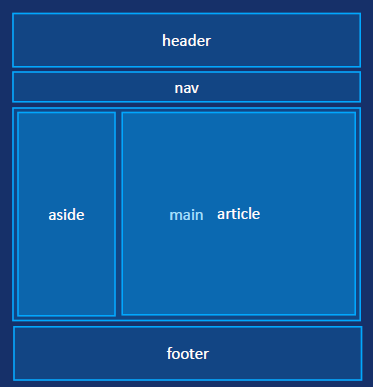
网站结构标签
| 标签 |
功能 |
| header |
网页页眉(头部) |
| nav |
导航栏 |
| main |
网页内容,每个页面只能有一个 |
| aside |
侧边栏 |
| article |
文章相关 |
| section |
分块 |
| footer |
页面页脚(底部) |
无语义标签
列表标签
1
2
3
4
5
6
7
8
9
10
11
12
13
|
<ul>
<li>
1
<ul>
<li>1.1</li>
<li>1.2</li>
<li>1.3</li>
</ul>
</li>
<li>2</li>
<li>3</li>
</ul>
|
效果与下方markdown效果相同
1
2
3
4
5
6
7
8
9
10
|
<dl>
<dt>浙江</dt>
<dd>杭州</dd>
<dd>宁波</dd>
<dt>江苏</dt>
<dd>南京</dd>
<dd>无锡</dd>
</dl>
|
表格标签
| 标签 |
功能 |
| table |
表格容器标签 |
| caption |
表格标题 |
| tr |
行标签 |
| td |
单元格标签 |
| th |
表头单元格标签 |
| thead |
表头区域 |
| tbody |
表格内容区域 |
| tfoot |
表格底部区域 |
1
2
3
4
5
6
7
8
9
10
11
12
13
14
15
16
17
18
19
20
21
22
23
24
25
26
27
| <table>
<caption>表格标题</caption>
<thead>
<tr>
<th>姓名</th>
<th>年龄</th>
<th>性别</th>
</tr>
</thead>
<tbody>
<tr>
<td>A</td>
<td>20</td>
<td>male</td>
</tr>
<tr>
<td>B</td>
<td>25</td>
<td>female</td>
</tr>
</tbody>
<tfoot>
<tr>
<td colspan="3">合计2人</td>
</tr>
</tfoot>
</table>
|
添加表格的边框以及合并效果
1
2
3
4
5
6
7
8
9
10
| th,
td {
border: 1px solid black;
width: 80px;
text-align: center;
}
table {
border-collapse: collapse;
}
|
表单控件
- 表单容器
form标签
action:在提交表单时,应该把所收集的数据送给(URL)去处理method:表单提交的方式为get或post等
1
2
3
| <form action="" method="get">
<input type="text">
</form>
|
1
2
3
4
5
6
7
8
9
10
11
12
13
14
15
16
17
18
19
20
21
22
23
24
25
26
27
28
29
30
31
32
33
34
35
36
37
38
39
40
41
42
43
44
|
<form action="" method="get">
用户名:<input type="text" placeholder="Enter your username" name="uname" maxlength="10" autocomplete="off">
<br>
密码: <input type="password" name="pwd" autocomplete="off">
<br>
<label>
<input type="radio" name="gender" value="male">男
</label>
<input type="radio" name="gender" value="female" id="female" checked>
<label for="female">女</label>
<br>
<label>
<input type="checkbox" name="hobby" value="1">1
</label>
<label>
<input type="checkbox" name="hobby" value="2" checked>2
</label>
<label>
<input type="checkbox" name="hobby" value="3">3
</label>
<br>
<input type="file" multiple accept=".xlsx,.xls">
<br>
<textarea name="textarea"></textarea>
<br>
<select name="level">
<option value="a">A</option>
<option value="b" selected>B</option>
<option value="c">C</option>
</select>
<br>
<input type="button" value="提交">
<button type="reset">重置</button>
</form>
|
字符实体
| 字符 |
实体 |
说明 |
| |
|
不换行空格 |
| < |
< |
小于 |
| > |
> |
大于 |
| & |
& |
实体或字符引用的开头 |
| © |
© |
版权符号 |
| ™ |
™ |
商标符号 |